Showing posts with label personal blog. Show all posts

Monday, March 28, 2022

Visualizing access logs from my blog server

One of the things I’ve missed, having moved my blog off of Blogger, is the metrics. I don’t use the metrics for much, but there’s a nonzero serotonin hit to knowing that my content is read by someone. It’d be nice to be able to restore at least that piece of the Blogger feature-set.

Fortunately, I have access logs and a log analyzer.

I’ve settled on goaccess for my log analysis; it’s pretty straightforward, takes HTTP access logs as input, and presents the data visually (including on the command line). It’s installable on my local machine via the package manager (sudo apt-get install goaccess), so no problems there.

The steps are pretty straightforward:

  • Get the logs
  • Dump them into goaccess

The script to do that is short and sweet:

#!/bin/bash

SERVER=fixermark.com
LOGPATH=logs/personal-blog.fixermark.com/http
DESTINATION=logfiles

mkdir -p "$DESTINATION"
scp $SERVER:$LOGPATH/access.log* $DESTINATION
pushd $DESTINATION
# this is redundant because it's a symlink on the server to the most recent logfile
rm access.log.0
# gunzip will confirm replacing files
yes | gunzip -f *.gz
popd
goaccess $DESTINATION/access.log*

I run that, and I’m presented with a nice terminal interface for viewing the logs.

Terminal interface, showing categories for Requested Files, static requests visitor hostnames and IPs

This is a good start!

Filtering

goaccess doesn’t support any filtering directly, but access logs are relatively simple to filter with command-line tools, and goaccess does support receiving its logs from the command line. Here’s a simple script to drop the logs related to various static content pieces:

cat $DESTINATION/access.log* | \
    grep -v /lib/ | \
    grep -v /css
	grep -v /images/ | \
    grep -v /js/ | \
    goaccess --log-format=COMBINED -

Adding this to the fetch script, the logs are now honed in on just posts.

To do next

Only a couple things I'd like to improve in this flow:

  • scrubbing logs—after 21 days, I’d like to substitute the IP addresses with 0.0.0.0 to increase user anonymity.
  • Run these server-side (or have goaccess pull them remotely, if possible) so logs aren’t living on more machines than strictly necessary.

Monday, March 14, 2022

Self Hosted Hugo Comments: embedded in page with shortcodes

Having chosen to self-host my Hugo comments as part of the static page content, there are a couple of ways to do it. In this article, I explore embedding them in the page using shortcodes.

The method

Comments in my blog are represented by two shortcodes.

comment.html

The first shortcode collects comment data in a semi-structured way and emits it as HTML. Here’s the whole thing.

/layouts/shortcodes/comment.html

{{- $postid := default (.Get 0) (.Get "id") -}}
{{- $username := default (.Get 1) (.Get "username") -}}
{{- $usericon := default (.Get 2) (.Get "usericon") -}}
{{- $postdate := default (.Get 3) (.Get "date") -}}

<div class="comment">
  <div class="user-info">
    {{ if $usericon }}
      <img src="{{$usericon}}">
    {{ end }}
    {{ $username }} {{ $postdate }}
  </div>
  <div class="comments-menu"><a href="mailto:blog+personal-comment@fixermark.com?body=Your Name:%0d%0aIcon:%0d%0aComment:&subject=Comment on {{ $.Page.Permalink }}?comment-id={{ $postid }}">Reply</a></div>
  <div class="comment-body">
    {{ .Inner }}
  </div>
</div>

This code is triggered as, for example,

\{\{< comment id="100" username="Phil P" date="2021-10-21T16:54:40.122Z" >}}
You have working audio on your GNU/Linux laptop?  Must be nice.

  \{\{< comment id="101" username="Mark T. Tomczak" date="2021-10-21T17:56:00.084Z" >}}
  I used to, but I changed my window manager and now I'm not so sure. :-p
  \{\{< / comment >}}
\{\{< / comment >}}

Note that the approach supports nesting; a comment emitted into the Inner material of another comment is just copied along with the other content, so we just roll the comment tree up as we go.

Also worth noting in the definition of the shortcode is the mailto link. The link is constructed such that it auto-populates the body and the subject for easy adherence to the commenting policy; uesrs get started with a template email that will get me the right information to add their comment. Right now, this process is manual, but I’ve attempted to wire it up so it can be easily automated in the future.

comments.html

A wrapper shortcode serves as an envelope for all the comments on the page and provides some placeholder text if there are no comments.

/layouts/shortcodes/comments.html

<div class="comments">
  <h1 class="comments">Comments</h1>
  <div class="comments-menu">
    <ul>
      <li>
        <a href="mailto:blog+personal-comment@fixermark.com?body=Your Name:%0d%0aIcon:%0d%0aComment:&subject=Comment on \{\{ $.Page.Permalink }}">
          Add comment
        </a>
      </li>
      <li>
        <a href="/how-to-comment">How to comment</a>
      </li>
    </ul>
  </div>
  \{\{ if (not .Inner) }}
  <i>This article has no comments</i>
  \{\{ else }}
  \{\{ .Inner }}
  \{\{ end }}
</div>

This code injects the HTML to show a Comments section in the page; it constructs a mailto link like the Reply button does (exercise for the reader: both of those links can stand to be further consolidated into their own shortcode, since they’re so similar). It also provides a simple placeholder text if there are not yet any comments.

Overall, I’m not at all unhappy with the result! (Editor’s note: I haven’t done a CSS pass on this yet, this just shows structure).

A couple of comments embedded in the blog post

Pros and cons

Overall, I’m not unhappy with this approach, but it has some tradeoffs.

Pros

Thread flow is very clear
The fact replies are nested means it’s easy to see the flow of the conversation by reading the markdown itself.
Comment text is just markup
The comment text is just inline HTML, so relatively easy-to-read. It also supports everything I could possibly want to support (abuse of this—after all, it’s user-supplied content directly injected into the page—is moderated by the fact that the comments are hand-stitched into the page by me).

Cons

Mixes content and presentation
To support this approach, we need the \{\{< comments >}} shortcode on every page. Even though Hugo supports template pages (archetypes), that’s a maintenance burden. Ideally, stitching comments into the page should be the job of the layout itself, while the comments would be metadata for the page.
Markup, not markdown
Because shortcodes output HTML, I can’t use Markdown for the body of the comments; trying to pass a comment with replies through the Markdown parser mangles the HTML emitted by the nested \{\{< comment >}} shortcodes. Markdown is easier to work with and further constrains the styling in a nice way, which I enjoy.
Lack of consolidation
There’s benefit to having comments consolidated in one place for management. For example, adding a new comment with this approach requires mapping from the Subject line of an email to the relevant URL (and comment ID). If comments were consolidated in one place, adding new comments would be a simple append operation.

What’s next?

This approach is working for now, but I’m going to pursue moving the comments into page front-matter (or even a central data file that is read once and built into a scannable structure).

Monday, March 7, 2022

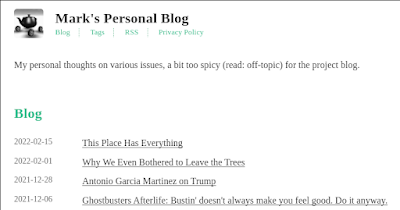
I'm switching my personal blog to self-hosting via Hugo

After putting a bit of thought into it, I’ve decided to start the process of switching my personal blog to self-hosting on Hugo instead of hosting through Blogger. This blog is staying where it is, but I’ve been playing with the Hugo framework for awhile and am finding I really enjoy it. Expect to see some posts about my experiences with it in here from time-to-time.

An image of the blog, showing new header style and list of entries

Why switch?

Even with the benefit of Google Takeout, moving blog infrastructure is time-consuming. So why have I bothered? A few reasons, in no particular order:

Tooling and control

Blogger’s UI hasn’t been updated in approximately ten years. It’s an acceptable WYSIWYG editor, but the resulting under-the-hood HTML is opinionated and has some weird formatting decisions. The editor also doesn’t support many keyboard accelerators, and it’s incredibly frustrating to have to break flow typing to go push a button to change style. In practice, I’ve been side-stepping the UI completely for weeks by writing blog posts in Markdown and copying-and-pasting the resulting HMTL directly into the raw editor view in Blogger. And I’m ultimately at the mercy of Blogger’s opinion of how layout should be done; some of my images overflow the content space, and I can either shrink them or leave that as-is.

Hugo lets me cut out the middle-man in that process; it renders directly from Markdown to HTML and the rendering can be reconfigured. The renderer is extensible via shortcodes that tap into the Go infrastructure under the hood. I’m doing most of my blogging in emacs now, and it feels great. In the future, I should be able to automate the flow of adding a post, recompiling, uploading to my server, and publishing updates.

Privacy, tracking, and censorship

Of all the reasons, this is the least significant one, but it bears mentioning: I think enough of my potential readers have come to care about the information-harvesting capacity of Google that I’d like to do them a solid and move off of a Google-hosted service. I’ll lose some of my analytics, and I have to support my own comments, but I think those are going to be exciting enough challenges to justify the cost. The recent rulings regarding Google Analytics and the GDPR seem to have some people backing towards the exits on that infrastructure anyway.

Google also has a bad habit (or good habit, if your goal is to combat spam and bad actors; I’m still enough of a company man that I see it their way too) of deciding you’ve violated their terms of service and blowing all your Google services out of the water as a result. I’ve already soft-firewalled the personal blog behind ownership by my non-primary account, but since it’s the “spicier” one, I run the risk that I’ll trip over Google’s constantly-evolving TOS some day, they’ll decide my primary and non-primary accounts are the same actor, and I’ll lose both. Moving the entire thing off to another host decreases the odds of that outcome.

Things I’ll miss

Not too many, it turns out.

Embedding images

One thing the WYSIWYG editor actually does do quite nicely is image embedding. The flow in Hugo isn’t as clean; I have to copy the image into a folder alongside the blog post and then reference the filename in the Markdown. That having been said, I strongly suspect I’ll be able to automate that process with a couple of emacs macros to turn it into fetching an arbitrary file, copying it into the right location, and adding the reference.

It turns out, embedding video is more straightforward in Hugo; there’s a shortcode for linking to YouTube (assuming I don’t just self-host the video content).

Will the old content be going away?

No. I don’t plan to add more posts to the personal blog, but I’ll be keeping it up so that hyperlinks don’t break. This will, in practice, fork comments, but I’ve decided I don’t care too much about that issue (comment load is low enough that it’s a non-issue).

How will you do comments on the new blog?

Great question! As a static site generator, Hugo’s engine doesn’t handle comments natively. Hugo integrates with a variety of comment engines, but after putting some thought into it and reading what others have done, I decided to just have people email me comments and I’ll embed them into the site. This doesn’t completely detach me from Google (my email service is GMail), but it gives users some confidence that I’m not dumping their information directly into the hopper.

Will I be moving this blog?

It’s possible, but I think unlikely in the near future. This one is heavier (including more images and more posts), and will take quite a bit more time. But if my experience with the personal blog goes well, we’ll see.

Where is the new blog?

The new blog is at http://personal-blog.fixermark.com. You can also subscribe to the Atom RSS feed.